MobilePDF Editor: quick on-device image-to-PDF tool for Android
Experience compact mobile document conversion: MobilePDF Editor: Image to PDF, by FuMaoMao, turns photos into PDFs. The app supports multi-image selection to merge photos into single PDFs, and lets users adjust cropping and rotation before export. It operates offline for local processing, offers password encryption for documents, and provides file renaming, sharing, and basic organization tools. Students, office professionals, and remote workers gain a quick mobile scanning and document workflow without relying on a desktop.
What does the conversion workflow deliver?
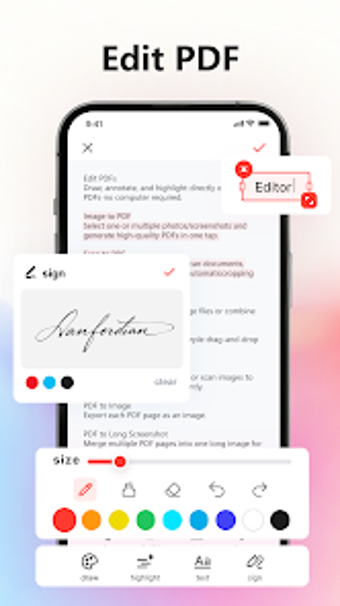
The app accepts common image types such as JPG, JPEG, and PNG and can combine multiple pictures into one PDF, supporting batch processing for receipts or multi-page notes. Built-in image edits include cropping, rotation, and filter adjustments prior to export. The tool also handles existing PDFs, offering merge and split operations plus basic file management for renaming and sharing.
Does it affect device performance during use?
The developer positions the app as a lightweight option aimed at quick mobile operations, so conversions and edits run locally on the device rather than relying on network transfers. Local processing reduces dependency on connectivity and avoids upload delays. This design is intended for routine scanning tasks on typical modern Android smartphones and tablets without heavy background load on other apps.
Is it secure enough for confidential documents?
Security is addressed through an option to set passwords and encrypt generated PDFs, and offline operation keeps processing on-device to limit external exposure. In addition, file management features let users rename and share documents under their own control. These choices support keeping sensitive material local rather than moving it to external servers.
Do non-technical users need specialist knowledge to operate it?
The interface emphasizes a simple workflow for capturing images, adjusting them, and exporting PDFs, which suits students and casual users. In addition, the inclusion of PDF merge and split tools gives more experienced users a way to handle multi-file edits without desktop software. Some PDF tasks may still require basic familiarity with document concepts, but everyday scans require little technical setup.
Practical mobile-first choice for on-device document work, with an Android limitation
MobilePDF Editor is a practical option for Android users who need on-device image conversion and straightforward PDF handling; it supports local processing and encrypted files. The main caveat is platform scope, since functionality is presented for Android devices only. For best results, perform batch image converts during a single session and store completed PDFs in an organized folder on your device.
Pros
Batch image merging creates single PDFs from multiple photos
Built-in cropping, rotation, and filter adjustments before export
Password encryption available for generated PDF files
Offline processing keeps conversions local to the device
Cons
No advertised optical character recognition for searchable PDFs
Feature set presented for Android devices only
Loading…
About permissions
Before downloading, you can take a quick look at the permissions this app may request on your device. App permissions allow certain features to work properly, such as accessing your camera to take photos, your location for maps, or your storage to save files.
In this section, you’ll find a clear and simple overview of the types of permissions the app uses, grouped by their level of sensitivity, along with a visual breakdown to help you understand them at a glance. This way, you can see how the app interacts with your device and decide to download with confidence.
Permissions types
Standard
44%
Non-standard
11%
Sensitive
44%
Permissions distribution
Privacy
22%
Data collected
56%
Data shared
22%
Data safety info
Privacy
2 permissions
Permissions that allow the app to access personal or sensitive information stored on your device, such as location, contacts, camera, or microphone.
android.permission.READ_PHONE_STATE
Sensitive
android.permission.WAKE_LOCK
Standard
Data collected
5 permissions
Information the app may gather from your device or usage activity to enable features, personalize content, and improve overall performance.
android.permission.MANAGE_EXTERNAL_STORAGE
Non-standard
android.permission.CAMERA
Sensitive
android.permission.ACCESS_NETWORK_STATE
Standard
android.permission.ACCESS_WIFI_STATE
Standard
android.permission.READ_EXTERNAL_STORAGE
Sensitive
Data shared
2 permissions
Information that may be shared with trusted third parties to provide services, support app functionality, or deliver relevant content.
android.permission.INTERNET
Standard
android.permission.WRITE_EXTERNAL_STORAGE
Sensitive
This report summarises the permissions declared by the app at the time of scanning and groups them into Privacy, Data collected and Data shared. A declared permission shows what the app can access, it does not necessarily mean personal data is collected or transmitted. For full details check the app’s privacy policy and the developer’s clarifications shown below. Softonic generates this report automatically from the package metadata; it is informational and not a substitute for a full security or privacy audit.
Laws concerning the use of this software vary from country to country. We do not encourage or condone the use of this program if it is in violation of these laws. Softonic may receive a referral fee if you click or buy any of the products featured here.